

Every year, millions of people lose money to online scams and cyberattacks, and teenagers are often targeted. A weak password can give someone access to several of your accounts. A fake login page can trick you into handing over personal information before you even realize something is wrong.
Cybersecurity means protecting your devices, accounts, networks, and data from digital threats. Information security is a broader concept that focuses on keeping information safe, accurate, and private. You do not need to be a technology expert to understand the basics. In fact, learning about cybersecurity for high school students can help you stay safer online and prepare you for useful skills in the future.
This guide breaks everything down in simple language. You will learn where to begin, how common attacks work, which tools can help, and what cybersecurity careers might look like. Each topic connects to situations you may actually encounter, such as phishing emails, hacked passwords, or suspicious links.
The best place to start is with two easy habits: use a password manager and turn on multi-factor authentication. These steps take only a few minutes, but they can make a big difference. Cybersecurity for high school students is not about knowing everything right away—it is about making smarter choices online, one habit at a time.
Key Takeaways
- Cybersecurity defends systems, networks, and data from digital attacks; Information Security keeps all information private, accurate, and available.
- The biggest threats to students are phishing, weak passwords, malware, and unsafe public Wi-Fi.
- Network Security, Cryptography, Malware, Threat Intelligence, Cloud Security, and Incident Response all fit under one umbrella.
- Strong habits cost nothing to start: a password manager, multi-factor authentication, and routine updates.
- A clear path runs from free lessons to competitions, certifications, internships, and paid security roles.
What Is Cybersecurity and Why Does It Matter for High School Students?

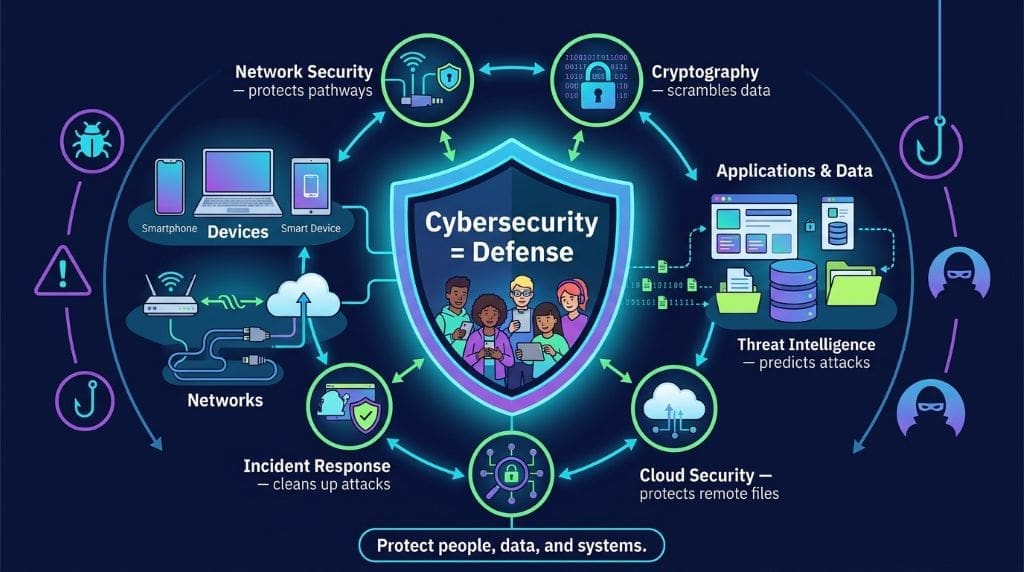
The term describes defense, not offense. It covers every layer that keeps digital life safe. That protection spans devices, networks, and applications. It also guards the sensitive data flowing between them. This subject links closely to several related fields. For instance, Network Security guards the data pathways. Cryptography scrambles data so that strangers cannot read it. Malware is the harmful software these defenses block. Threat Intelligence predicts what an attacker might try next. Cloud Security protects files stored on remote servers. Incident Response handles the cleanup after an attack succeeds. In short, no single tool does the whole job. A defense works only when these pieces cooperate. To that end, learn the field map first. After that, drill into each detail. In either case, the goal stays the same. You protect people, data, and systems.
Cybersecurity vs. Information Security vs. Network Security
People often use these three names as if they were the same. That habit leads to confusion later. Each term has its own role and limits. Knowing the difference helps a student choose a path. It also helps a candidate speak clearly in interviews. To explain, one term is a subset of another. The middle term is the widest net. With this in mind, read the definitions below. They move from broad to narrow in a clean order. For example, a hospital record is a type of information. A router is network equipment. A laptop with internet access is a cyber device. Each one needs a different protection plan. For that reason, the three fields often work side by side. At the same time, they do not mean the same thing. In short, keep the three labels separate. So you can discuss them carefully.
Cybersecurity
The protection of internet-connected systems, hardware, software, and data from digital attacks.
Information Security
The broader discipline of keeping all information secure, accurate, and private, in any form.
Network Security
The subset that defends a network’s pathways, devices, and traffic from intrusion and misuse.
Why Are High School Students Cybersecurity Targets?
Young users make attractive victims. Attackers know that students often reuse one password across many sites. Those students also share too much on social media. Many teenagers skip software updates because the prompts feel annoying. As a result, criminals find easy entry points every day. In fact, identity theft aimed at minors often hides for years. A child’s clean credit record holds real value. Above all, the damage multiplies fast. One stolen account can open the door to email, games, and banking. With this in mind, parents and teachers should start early lessons. Because habits form early, a mistake can follow you for years. So digital safety is no longer optional. Students who learn early carry safer routines into college and work. To that end, every school day should include digital care.
The Core Layers of Cybersecurity
A good defense uses many layers at once. Think of a house with locks, alarms, and lights. Each layer slows an attacker down. Even if one fails, another holds firm. At the base sits authentication. It checks that you are really you. Next comes authorization. It decides what you may touch. After that, encryption protects data both in transit and at rest. Monitoring watches for odd behavior around the clock. Incident response steps in when something still slips through. So treat security as a system, not a single app. Beyond tools, good habits matter most. As a result, the safest users pair smart tech with careful choices. In either case, no product replaces common sense. For that reason, build the layers one at a time.
What Are the Most Common Cybersecurity Threats Students Face?
Students meet threats every day, yet most never notice them. Understanding the danger improves your defense. Each threat below shows up in everyday digital life. Naming them is the first step to stopping them. Similarly, a doctor names a disease before treating it. So a student should name a scam before resisting it. After that, each short section below explains one threat. With this in mind, you can spot the signs fast. With that in mind, treat these next pages as a field guide. Read one threat at a time. Then test yourself on a real message. For that reason, examples follow every definition. Consequently, the lesson sticks with you longer. In short, recognition is your first and cheapest shield.
Phishing and Social Engineering
Phishing fools people into handing over their logins. A fake message looks exactly like a real one. The sender might claim to be a school or a bank. The email asks the student to verify an account. A link then leads to a copycat login page. Once the student types a password, the attacker captures it. Social engineering goes even further. It manipulates trust, urgency, and fear. A scammer might call and pretend to be tech support. In my own classroom, a student showed me a strange message. The message asked for a quick loan. In truth, the friend’s account had already been taken over. That brief moment changed how the class viewed requests. So students should always verify before they trust. At the same time, they should report anything suspicious.
Malware and Ransomware
Malware is short for “malicious software.” It includes viruses, worms, and spyware. Malware can log keystrokes, steal files, or hijack cameras. A device can get infected through malicious links or downloads. Ransomware locks a device and demands payment to free it. Coventry and Branley describe how these attacks have grown more common across critical systems. Their healthcare review offers a lesson for everyone. The same tactics that hit hospitals now hit schools. Attackers seek valuable data and weak defenses. Consequently, prevention beats recovery every time. That’s why backups and updates matter. After all, locked devices are small problems with clean copies. So long as a student keeps current backups, ransomware loses power. To that end, automate both habits now. In either case, never pay the ransom. In fact, paying often leads to nothing. For instance, thieves take the money and vanish. So keep offline copies instead.

Password Attacks
Most people choose weak passwords. Attackers exploit that habit with a few simple tools. Credential stuffing reuses stolen passwords across many sites. Brute force tries thousands of guesses per second. Both methods require little skill to run. Off-the-shelf scripts do all the work. Bonneau and colleagues spent two decades studying why passwords still dominate online authentication. Their framework shows that no perfect replacement yet exists. For that reason, strong and unique passwords still rule. A password manager removes the memory burden. Multi-factor authentication adds a second lock. As a result, even a stolen password becomes nearly useless. In either case, one extra step blocks most remote break-ins. For example, a reused password can lead to many accounts being stolen. So do not reuse passwords. Above all, do not reuse them for banking. Also, add a second factor everywhere. To that end, a modern student ranks passwords as job one.
Public Wi-Fi and Mobile Risks
Free Wi-Fi is convenient and often unsafe. An attacker on the same network can watch unencrypted traffic. Fake hotspots mimic real coffee shop names. Once connected, your data flows through the thief’s device. A VPN helps on untrusted networks, and phones need the same security precautions as laptops. App permissions can quietly reveal location and contacts. Lock screens and remote wipe protect a lost device. Because a phone holds so much, losing it hurts more. Mobile threats are growing faster than ever. As a result, students should treat public networks with caution. Turn off auto-connect to open hotspots. Also, keep the lock screen on. In short, treat Wi-Fi like a shared room. Keep private things off it. To that end, use your phone plan for banking. For that reason, save public networks for casual browsing only.
How Can High School Students Stay Safe Online?
Good habits make attacks far less likely. These steps cost little or nothing. They work for anyone, not just technical people. Each habit builds a stronger personal defense over time. In due time, several habits become second nature. After all, safety grows from small, repeatable choices. It never grows from one big purchase. To that end, start with just one habit below. Master it before you add the next. For that reason, the order here follows difficulty. Begin with passwords and multi-factor authentication. Then move to updates and backups. After that, sharpen your clicking instincts. In short, consistency beats a one-day marathon. As a result, you turn risk into routine.
Use a Password Manager and Multi-Factor Authentication
Let a program create and store unique passwords. People cannot recall dozens of random strings. A password manager solves that problem well. Multi-factor authentication adds another check beyond a password. A code, a fingerprint, or an app prompt confirms your identity. Together, these two tools stop most credential attacks. This starter explainer walks through the core tools and methods step by step. The setup takes about ten minutes. After that, the protection runs almost on its own. To start, gather a manager, an authenticator app, and unique passphrases.
All in all, this habit returns the most value. In fact, it blocks most of the attacks mentioned earlier. So begin here before you add anything else.
Keep Software Updated and Back Everything Up
Updates fix the holes attackers love. Vendors patch flaws as soon as researchers find them. A device that skips updates stays exposed longer. Set updates to install automatically on every gadget. Then back up important files to a separate location. Because ransomware can strike any machine, backups are the best rescue. Cloud storage works well for photos and documents. A local drive works too, as long as you keep it offline between backups. As a result, a worst-case attack becomes a minor hassle. So long as a copy exists, recovery is cheap and fast. To that end, test your backups periodically. A backup that does not restore is no backup at all. In essence, updates and backups form a simple insurance policy.

Think Before You Click and Share
Most attacks begin because someone clicked too fast. Hover over links to preview the real address. Check the sender’s full email, not just the name. When in doubt, open the official site in a new tab. You should also limit what you post in public. Birthdays, addresses, and travel plans help scammers build a profile. Lock down social accounts to friends only. To illustrate, a “security question” about your first pet becomes useless. That’s true if nobody knows the pet’s name. Small choices add up very quickly. With attention to these details, a student becomes a hard target. After all, attackers prefer easy victims. Similarly, oversharing gives a thief the keys to reset your device. So think twice before you tap a link.
Lock Your Devices and Use a VPN
A PIN or a biometric lock protects a lost phone. Enable remote wipe so you can erase a stolen device. On public Wi-Fi, a VPN encrypts your traffic. That shielding keeps snoops from reading it. Also, turn off auto-connect to open hotspots. Treat unknown cables and USB drives as potential threats, too. Charging ports in airports can transfer data, not just power. By all means, carry your own charger and cable when traveling. Above all, never leave a device open in public. In either case, a few cheap habits stop a costly loss. With this in mind, treat an open network as hostile.
Guard Your Email and Social Accounts
Email is the master key to most online life. One hacked inbox can reset every other password. So protect it with a strong, unique password and MFA. Check connected apps and logged-in sessions from time to time. Remove access for services you no longer use. On social platforms, review privacy settings each term—limit who can see posts, friends, and personal details. Be wary of quizzes that ask for personal facts. Those answers often feed password recovery systems. For example, a fun quiz may collect security-related answers. In either case, the fun is rarely worth the exposure. At any rate, cautious sharing keeps your identity safer. Therefore, treat every account as a door with a strong lock.
What Skills Do You Need to Start a Cybersecurity Career?
The field needs millions of new workers. Employers care about skills more than a degree alone. Students can start building those skills today. In fact, the path begins with free practice at home. Moreover, these skills transfer far beyond security jobs. They teach logic, patience, and attention to detail. So students build useful habits before the first paycheck.
Foundational Skills to Build
Start with the basics of how computers and networks work. Learn how data moves across the internet. Practice simple Linux commands and basic scripting. After that, study how operating systems manage users. Researchers at IEEE catalog the machine learning methods behind modern intrusion detection. Likewise, an open survey in the journal Cybersecurity maps the techniques and datasets used in intrusion detection systems. These resources are dense, yet they reveal what employers care about. In short, curiosity beats a formal title. Then again, structured learning keeps that curiosity on track. With this intention, aim for steady weekly progress. As a result, the early weeks pay off later.

A Seven-Point Path to a Cybersecurity Career
- Learn the definitions. Separate Cybersecurity, Information Security, and Network Security. Know how each one differs.
- Study networks and encryption. See how data travels. Learn how scrambling protects it.
- Recognize malware and social engineering. Know the signs of phishing, spoofing, and ransomware.
- Master defense-in-depth habits. Combine strong authentication, patching, backups, and least-privilege access.
- Explore cloud and mobile security. Practice securing accounts, apps, and cloud data.
- Build a home lab. Run capture-the-flag challenges in a safe sandbox.
- Map your career route. Move toward certifications, internships, and competitions.
Cybersecurity Competitions and Hands-On Practice
Nothing teaches like doing. Capture-the-flag (CTF) events present puzzles that mirror real attacks. CyberPatriot invites student teams to defend mock systems. Site tools such as TryHackMe guide learners through safe rooms. These tools run in legal sandboxes. For example, solving a password challenge teaches authentication deeply. As a result, your resume grows alongside your knowledge. Start small and stay consistent. Thirty minutes a day builds real skill within months. In due time, that practice becomes a reusable portfolio. In fact, hiring managers ask about finished rooms. So record your progress as you go.
Where Can High School Students Find Free Learning Resources?
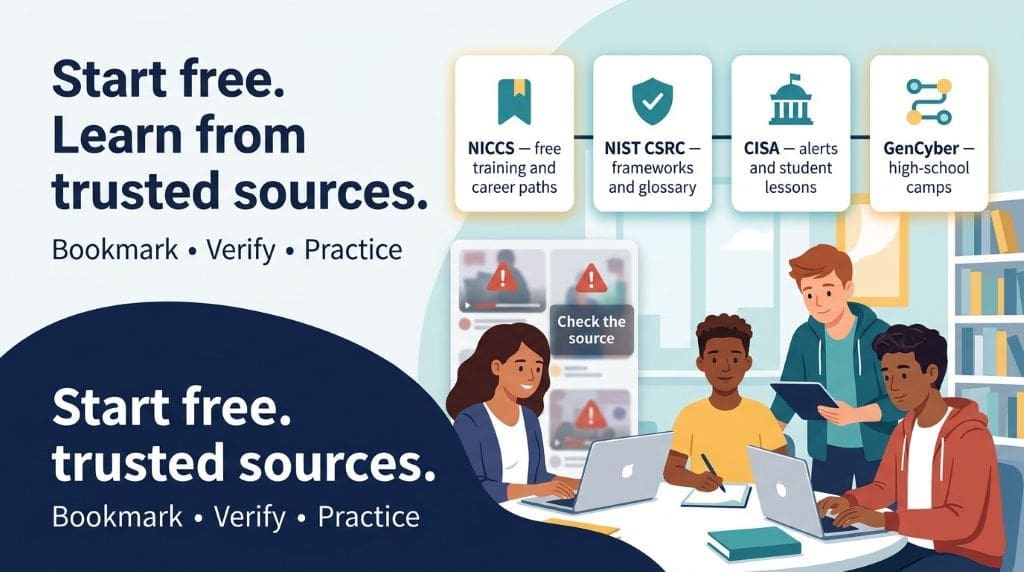
You do not need to spend money to begin. Many free, credible resources are available online. The list below includes only trusted institutions. Because accuracy matters in security, stick to proven sources. In contrast, random social media videos often spread wrong advice. With this in mind, build a short, stable reading list. Then return to it often.
This beginner definition guide offers a clean overview of the discipline and its types. It pairs well with the other entechonline explainer linked earlier. Together, the two articles frame the subject for newcomers. After that, deepen learning with government and university materials. To list the best starting points, several public agencies stand out. They also update their content frequently.
- NICCS (niccs.cisa.gov). Free role-based training and career pathways from a federal agency.
- NIST CSRC (csrc.nist.gov). The authoritative framework and glossary used across the industry.
- CISA (cisa.gov). Real-world alerts plus the Stop.Think.Connect. student lessons.
- GenCyber (nsa.gov). Summer camps for high school students, sponsored by the NSA and NSF.
These sites update often. They explain threats as soon as they appear. With this in mind, build your study around agencies and universities. Then use community platforms for practice, not facts. In fact, bad sources can undo good habits. So treat every claim with a little doubt. At any rate, verify advice against a trusted site first. By all means, bookmark the four links above now.
How This Guide Was Compiled
This guide follows a simple, transparent method. The statistical backbone comes from the 2026 Data Breach Investigations Report. Verizon publishes that report each year. It documents the leading causes of confirmed breaches. It anchors every claim about common attack patterns in real data. This article also reviews peer-reviewed, open-access literature. It draws on machine learning surveys and intrusion detection research. It also draws on studies of authentication and healthcare reviews. Each source is cited above and listed below. Finally, the practical advice reflects guidance from NIST and CISA. I also added firsthand classroom observations. So the result blends evidence, guidance, and teaching experience. As a result, readers can trust the numbers and examples.
Verified Resources
The following list links only to .gov, .edu, or peer-reviewed publications.
- CISA — Cybersecurity for Students — U.S. government agency guidance and lesson plans.
- NIST Computer Security Resource Center — official frameworks, standards, and glossary.
- NICCS — National Initiative for Cybersecurity Careers and Studies — federal training catalog and career tools.
- CYBER.ORG — K-12 curriculum developed with the U.S. Department of Homeland Security.
- Carnegie Mellon University Software Engineering Institute — academic research and security engineering guidance.
Frequently Asked Questions About Cybersecurity for High School Students
Cybersecurity protects computers, networks, and data from digital attacks, like digital locks for online information. Simple habits such as using strong passwords and avoiding scam emails can help keep you safe.
Students spend a lot of time online, so learning cybersecurity helps protect their money, grades, accounts, and reputation. It also builds problem-solving skills useful for college and future careers.
Yes, teenagers can begin by learning networking and computer basics, practicing with free resources, joining cyber competitions, or building a safe home lab. Curiosity, consistent practice, and demonstrating your skills can matter as much as formal education.
Common threats include phishing, malware, ransomware, account takeovers, password reuse, unsafe public Wi-Fi, and oversharing personal information. Strong unique passwords, careful clicking, and recognizing warning signs can reduce these risks.
Students should use unique passwords, enable two-factor authentication, keep devices updated, avoid suspicious links, limit personal information, and back up important files. They should also avoid unsafe public Wi-Fi when possible and report suspicious activity to a trusted adult.
References
Buczak, A. L., & Guven, E. (2016). A survey of data mining and machine learning methods for cyber security intrusion detection. IEEE Communications Surveys & Tutorials, 18(2), 1153–1176. https://doi.org/10.1109/COMST.2015.2494502
Khraisat, A., Gondal, I., Vamplew, P., & Kamruzzaman, J. (2019). Survey of intrusion detection systems: Techniques, datasets and challenges. Cybersecurity, 2, Article 20. https://doi.org/10.1186/s42400-019-0038-7
Bonneau, J., Herley, C., van Oorschot, P. C., & Stajano, F. (2012). The quest to replace passwords: A framework for comparative evaluation of web authentication schemes. 2012 IEEE Symposium on Security and Privacy, 553–567. https://doi.org/10.1109/SP.2012.44
Coventry, L., & Branley, D. (2018). Cybersecurity in healthcare: A narrative review of trends, threats and ways forward. Maturitas, 113, 48–52. https://doi.org/10.1016/j.maturitas.2018.04.008