
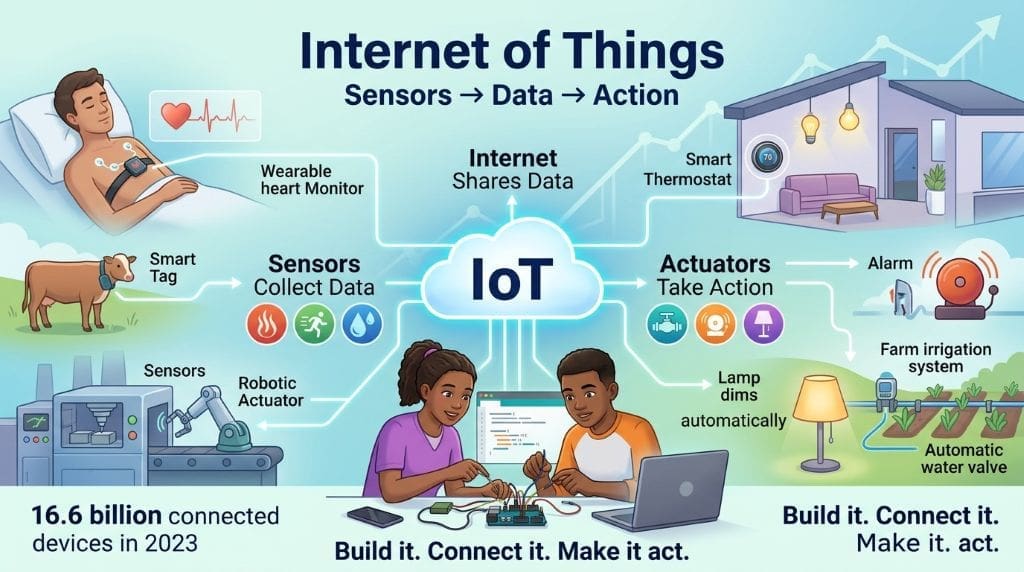
The Internet of Things (IoT) is a network of physical devices that collect, exchange, and act on data via the internet. Sensors read the physical world. They measure heat, motion, moisture, and light. Actuators then respond to that data. They open valves, ring alarms, and dim lamps. One device watches a patient’s heart. Another tag tracks a farm animal. A thermostat, meanwhile, controls a whole home. The scale is huge. IoT Analytics counted 16.6 billion connected devices in 2023. That number keeps climbing each year. In fact, the Internet of Things now touches farms, hospitals, and factories. Students can learn these systems by building them. Cheap boards and open code make this possible. Above all, this guide shows you where to start. It lists eight domains with real project ideas for IoT applications for students.
Key Takeaways
- Core loop: Physical devices sense, connect, process, and act.
- Student builds: Low-cost boards make real projects possible.
- Eight domains: Health, farms, cities, factories, and more.
- Evidence base: Open government and peer-reviewed sources only.
- Skills payoff: Portfolios open doors to IoT careers.
What Is the Internet of Things, and Why Do IoT Applications for Students Matter?
The Internet of Things looks complex at first. Still, the core ideas stay simple. You sense, connect, process, and act. With this in mind, here are seven ideas, in order.
The Foundational Concept
Physical things get a digital voice. A sensor gives a device a sense. An actuator gives it a muscle. Connectivity gives it a voice. As a result, a lamp can think and act. That single idea explains every IoT system. To explain, think of it as a nervous system. Sensors feel. Networks carry signals. Brains decide. Muscles respond. That mental model holds everywhere. Global value now backs this claim. McKinsey & Company estimates that IoT could enable $5.5 to $12.6 trillion in global value by 2030. Up to 65 percent of that value is business-to-business (Chan et al., 2025). So, the Internet of Things is not a toy trend. It is infrastructure for modern economies.

Image Credit: Infographic generated via Google Nano Banana 2.
System Components
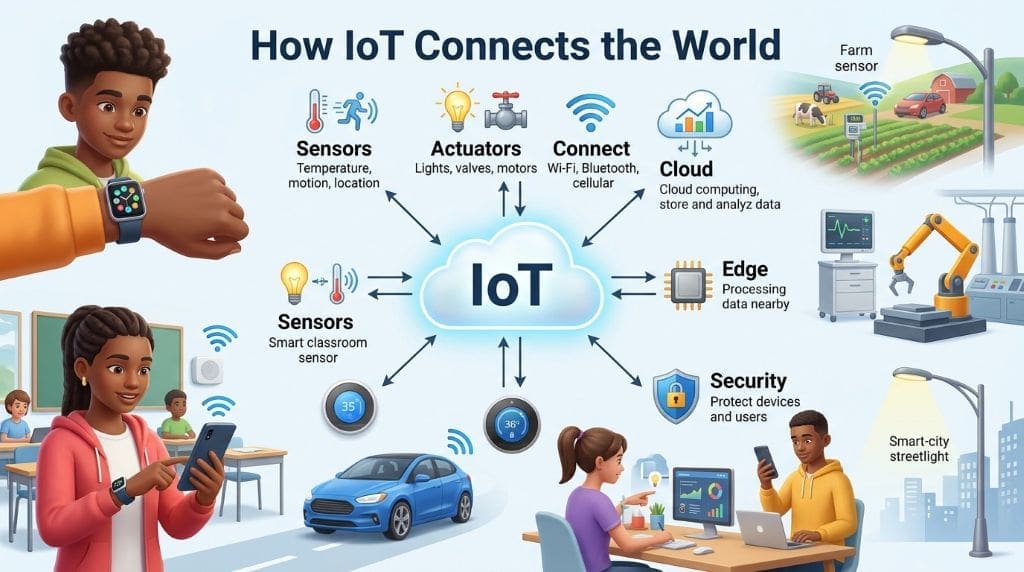
Next, meet the four building blocks. Sensors capture heat, motion, and light. Actuators make changes in the real world. Connectivity links devices to networks. Processing turns raw readings into decisions. To enumerate: sense, move, link, and think. Every IoT application for students rests on these four pillars.
Communication Methods
Devices then talk through many channels. WiFi suits homes and offices. Bluetooth Low Energy (BLE) pairs with nearby phones and is 2.5 times more energy efficient than Zigbee (Sethi & Sarangi, 2017). LoRaWAN covers kilometers at low power. In contrast, NB-IoT rides on cellular networks. To illustrate, a farm sensor uses LoRaWAN. A smartwatch, however, uses Bluetooth. Sigfox can stretch up to 1,000 kilometers but limits messages to 140 per day (Sethi & Sarangi, 2017). Each standard trades range for bandwidth. Students should test at least two options to feel the trade-offs.
Data Travels a Standard Path
A sensor creates a reading. Then a radio sends it to a gateway. The gateway may filter or compress it. After that, the data is sent to a platform. Dashboards display the final value. In effect, five steps turn physics into insight. Students should trace this path once. Build it with a temperature sensor. Watch the reading move from chip to chart. Most failures hide in this chain. One loose wire breaks step one. A bad token breaks step four. Consequently, tracing skills matter as much as coding.
Edge and Cloud Split the Work
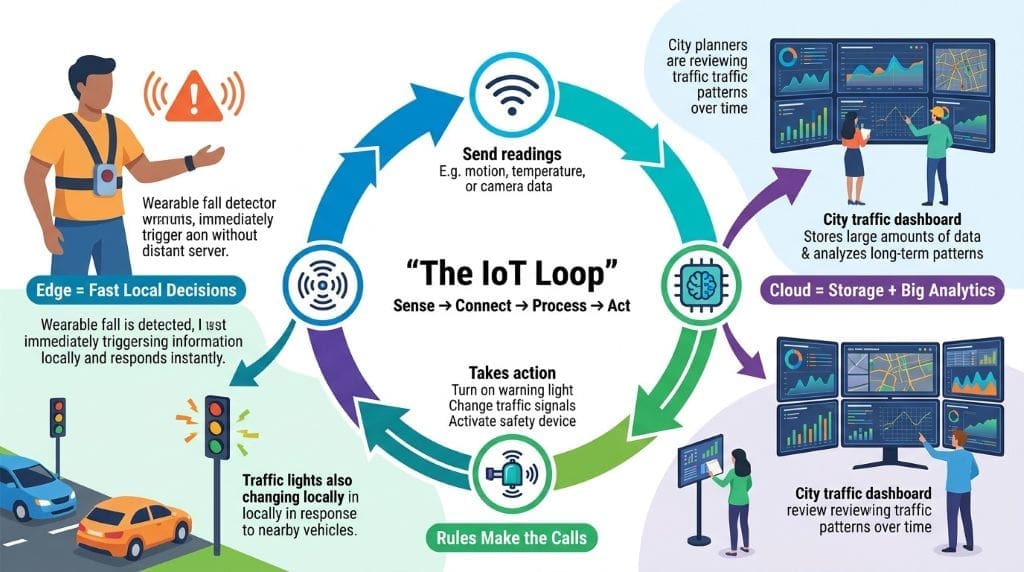
Every IoT system follows one simple loop. Sensors first collect raw readings. Connectivity then moves those readings somewhere. Processing decides what the data means. Actuators finally act on that decision.
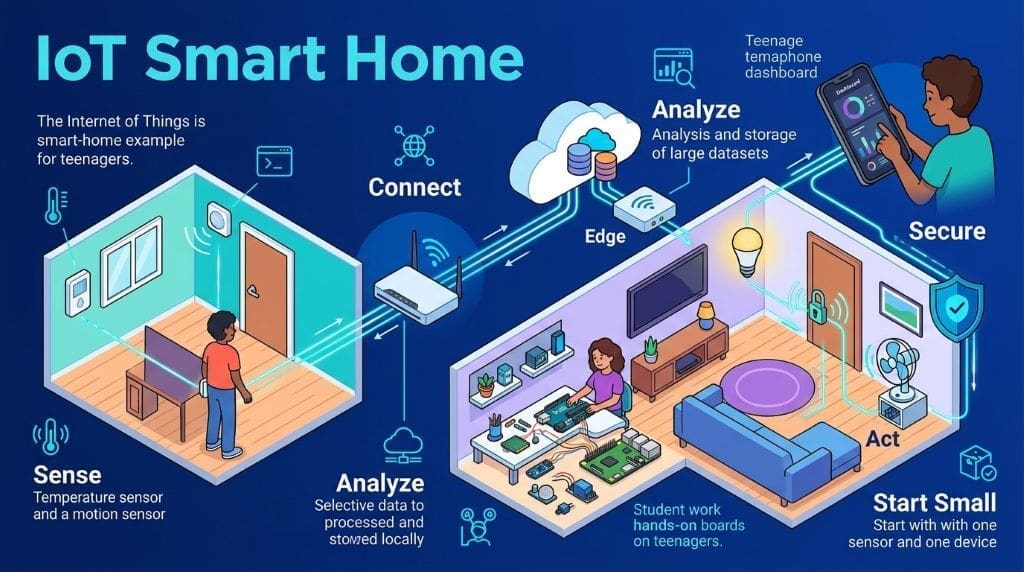
In contrast, humans rarely sit inside this loop. Instead, rules and models make the calls. Cloud services offer storage and big analytics. Edge devices handle local, fast decisions. For example, a fall detector acts instantly. It cannot wait for a distant server. In effect, edge and cloud split the work. Traffic lights react locally (Sethi & Sarangi, 2017). Yet city planners study traffic in the cloud. This split shapes every design choice in IoT applications for students.
Applications
After that, students meet real use cases. Health monitors track heartbeats. Soil sensors manage farm water. Smart streetlights save city energy. Factories watch machines for early faults. Each domain pairs with a student project. You can build these with basic kits.
Security Concerns
As a result, risk follows every connection. Weak passwords let attackers in. In fact, the Mirai botnet once enslaved 600,000 devices (Chataut et al., 2023). The botnet then attacked major DNS services. Variants still spread today (Chan et al., 2025). To point out, security is a skill. It is not an afterthought. Students who secure devices stand out. Healthcare devices average 6.2 vulnerabilities (Chan et al., 2025). IBM reported $4.82 million per average breach incident. Hospitals suffer the worst losses. Consequently, employers now prize security-aware builders.
Implementation Skills
So far, theory stays abstract. Implementation makes it real. Students need coding, wiring, and data skills. They read datasheets and debug logs. In effect, each IoT application for students teaches the full stack. Practice matters more than perfect code.
Career Implications
Lastly, skills turn into jobs. IoT roles span engineering, data, and security. Employers want proof of working systems. Consequently, a portfolio beats a résumé alone. You can review IoT fundamentals on EntechOnline.
| Term | Definition |
| IoT | Connected physical devices that sense, act, and share data over networks. |
| Industrial IoT | IoT used in factories, logistics, energy plants, and critical infrastructure. |
| Consumer IoT | IoT used in homes, wearables, vehicles, and personal devices. |
| Edge Computing | Local processing of IoT data near its source. |
| Cloud Computing | Remote storage and analysis of IoT data in data centers. |
What Are the Most Popular IoT Applications for Student Projects?
Projects bring the theory to life. In general, beginners start with one sensor and one dashboard. Later, they chain several devices together into a single system. To list, here are eight domains worth trying. Each domain appears in industry today and fits a student budget. You need a low-cost board and basic parts. An ESP32 or Arduino costs less than a good pizza. Free dashboards handle the data side. Consequently, cost rarely blocks a first project. So choose a domain that excites you.
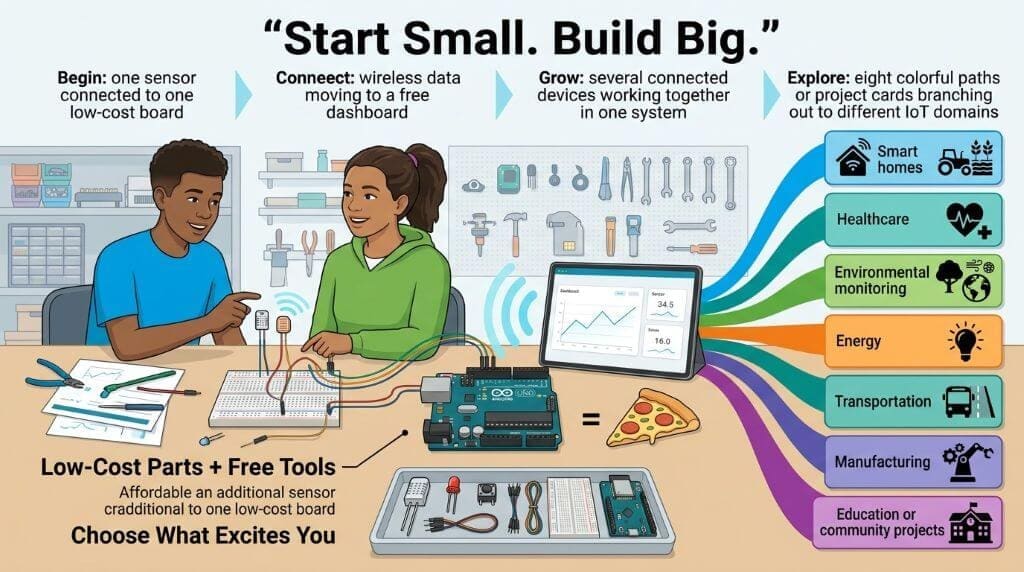
Image Credit: Infographic generated via Google Nano Banana 2.
IoT Applications for Students: 8 Practical Domains and Project Ideas
These eight domains form the backbone of real-world IoT systems today. Each one offers student-friendly projects that teach the full sense-connect-process-act loop. A single sensor and a free dashboard can launch any of these builds, and most kits cost less than a good pizza. Pick the domain that sparks your interest and start building.
1. Smart Home Automation
A basic relay turns a desk lamp into a smart lamp. A phone app then switches it from anywhere. In addition, a temperature sensor can drive a cooling fan. As a result, students learn control loops at home. Cheap boards keep the cost below fifteen dollars. This loop teaches input, logic, and output. Voice assistants also connect here. In effect, one project shows the full stack. Instructors like these builds because each step produces visible results. One lamp clicks on and off. A fan spins up. Consequently, students see progress every session. In short, home automation builds confidence fast.
2. Wearable Health Monitors
A pulse sensor plus a display makes a heart monitor. Accelerometers can also detect a fall. In effect, students copy real hospital tools. Wearables read pulse, steps, and sleep. Hospitals also use beds, pumps, and monitors. A clinic becomes one connected system. Sensors stream vital signs to caregivers.
Edge devices then filter data near the patient. Cloud systems store records for later analysis (Zaman et al., 2022). So students can build a simple heart monitor. An ECG or pulse sensor feeds a display. After that, data can flow to a phone app. This mirrors real IoHT products today.
Researchers call this field the Internet of Health Things (IoHT). Deep learning models now detect falls automatically (Zaman et al., 2022). One posture model hits 86 percent accuracy. Above all, privacy must be built into every design. Medical data demands privacy by design. Health data stays sensitive forever. So medical builds teach ethics early.
3. Smart Agriculture
A soil moisture probe guards a school garden. Readings trigger a small water pump. To explain, the loop is sense, decide, act. USDA valued smart irrigation at $801.9 million yearly (Chan et al., 2025). EntechOnline’s IoT explainer covers automated watering. Farm automation now feeds whole regions. Cheap components make this a perfect entry point for IoT applications for students in agriculture.
4. Smart Cities and Environment
Air quality sensors log dust and gas. Light sensors map traffic at a junction. So far, cities use exactly these tools. In fact, Padova, Italy, runs a famous proof of concept. Wireless nodes on streetlights measure temperature, humidity, and light. They also monitor the operation of public lighting (Zanella et al., 2014). The city collected seven days of readings. Consequently, students see how open data works. After that, dashboards turn readings into public insight. To be clear, cities prioritize interoperability above all. GCTC registered over 100 action clusters (Rhee et al., 2017). That program linked cities, universities, and companies. City services offer endless project hooks. Structural health monitors watch buildings and bridges. Waste bins report their fill levels. Noise maps track sound across neighborhoods. Traffic systems watch congestion in real time. Every service needs sensors and gateways. In effect, students copy the same playbook at school scale.
5. Smart Parking and Traffic
Ultrasonic sensors can detect a free parking spot. A light then signals the open space. In effect, drivers spend less time circling. Such systems already guide cars in modern cities. Students can copy the idea at a toy scale with a cardboard lot and toy cars.
6. Industrial IoT (IIoT)
Factories mount vibration sensors on motors. Readings warn of faults before production stops. In short, machines now schedule their own repairs. IIoT demands reliability, precision, and uptime. What changes is the cost of failure. One dead smartwatch annoys a user. A dead pipeline sensor can stop production. Consequently, IIoT tools favor durability and real-time response. Students can copy this with toy motors. A toy motor teaches the same monitoring logic. The principles remain identical at any scale.
7. Logistics and Tracking
A GPS module tracks a parcel across town. Temperature logs protect cold-chain goods. In contrast, RFID tags identify items at close range. After all, tracking is IoT’s oldest job. Supply chains now run on live data. Logistics hubs track thousands of assets daily.
8. Smart Energy and Utilities
A current sensor reads a home’s power draw. Smart meters report use to the grid. Consequently, cities can balance supply and demand. Energy grids balance supply in real time. Students can measure their own dorm energy. One dashboard shows the whole pattern.
Those eight domains overlap in practice. A farm project, for example, uses logistics tracking. A health build might add smart home controls. At any rate, the next sections show each domain in action.
Beginner-Friendly IoT Applications for Students
Smart home projects make ideal first builds. A relay module turns a desk lamp into a smart lamp. A phone app then switches it from anywhere. In addition, a temperature sensor can start a small fan. This loop teaches input, logic, and output. You can use an ESP32 or Arduino. Both boards cost less than a good pizza. As a result, failures stay cheap and teachable. At first, students wire one sensor at a time. After that, they chain motion, light, and sound. In short, home automation builds confidence fast.
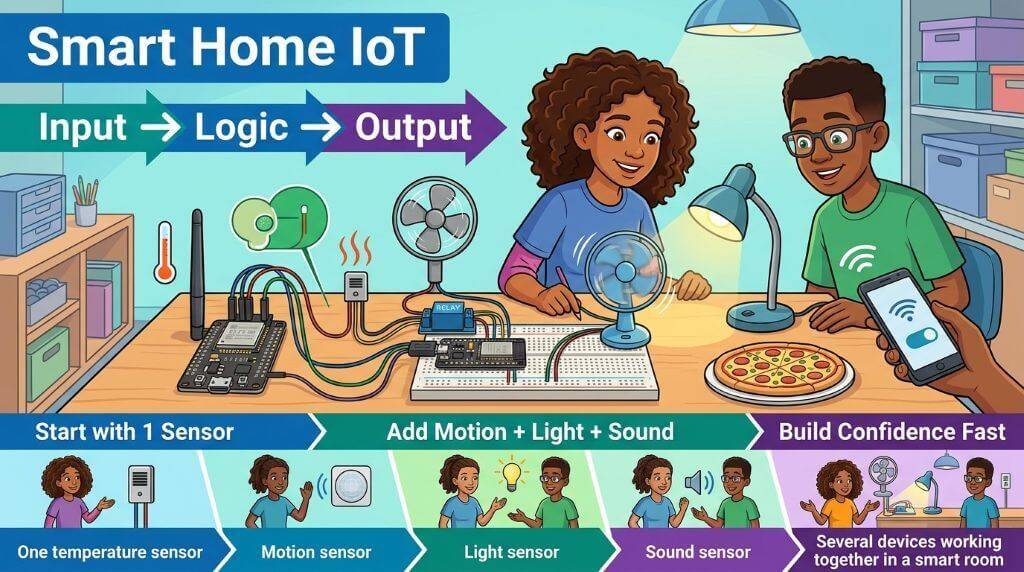
Image Credit: Infographic generated via Google Nano Banana 2.
Healthcare shows why the Internet of Things matters. Wearables read pulse, steps, and sleep. Hospitals also use beds, pumps, and monitors. In effect, a clinic becomes one connected system. Sensors stream vital signs to caregivers. Edge devices then filter data near the patient. Cloud systems store records for later analysis (Zaman et al., 2022). So students can build a simple heart monitor. An ECG or pulse sensor feeds a display. After that, data can flow to a phone app. This mirrors real IoHT products today. In fact, researchers refer to this field as IoHT. Above all, privacy must be built into every design.
How Do IoT Applications for Students Work? Devices, Connectivity, and Communication Methods
Every IoT system follows one simple loop. Sensors first collect raw readings. Connectivity then moves those readings somewhere. Processing decides what the data means. Actuators finally act on that decision.
In contrast, humans rarely sit inside this loop. Instead, rules and models make the calls. Cloud services offer storage and big analytics. Edge devices handle local, fast decisions. For example, a fall detector acts instantly. It cannot wait for a distant server. In effect, edge and cloud split the work. Traffic lights react locally (Sethi & Sarangi, 2017). Yet city planners study traffic in the cloud.
Communication Protocols
Devices talk through many radio standards. WiFi suits homes and offices. Bluetooth Low Energy pairs with nearby phones. NFC works at a few centimeters. LPWAN standards cover whole cities. LoRaWAN reaches 2 to 5 kilometers in urban areas. NB-IoT rides on cellular networks. Low-power networks need light protocols. 6LoWPAN compresses IPv6 for tiny radios, fitting packets within a 127-byte limit (Sethi & Sarangi, 2017). CoAP mimics web requests on constrained nodes. MQTT, in contrast, uses a broker. Devices publish data to topics. Other devices subscribe to those topics. As a result, many readers get one reading. This pattern suits dashboards and phone apps. Students see these protocols in most kits. Platforms tie the pieces together. They handle device registration and data flows. In general, students start with free dashboards. Later, they encounter larger middleware systems such as FiWare, which powers European smart-city work (Sethi & Sarangi, 2017).
Sensors and Power
Sensors define what a system can know. Some read the environment. Temperature, humidity, light, and gas sensors are common. Others read bodies and machines. Heart rate, motion, and vibration sensors abound. Calibration matters as much as wiring. Cheap sensors drift over time. Sensor fusion adds context. Two sensors together beat one alone. A light-and-motion pair detects presence. Power limits every design choice. Battery devices must sleep often. Each radio transmission costs precious millijoules. Consequently, sensors wake, read, send, and sleep. This is a critical lesson for all students on IoT applications.
What Skills Do Students Need for IoT Careers?
Students often ask which skills matter most. Employers rarely ask for one single tool. In general, they want systems thinking. Python, C, and SQL cover most builds. Networking basics explain how packets travel. Data skills turn readings into decisions. In addition, security awareness guards every layer. After that, cloud platforms connect devices at scale. To point out, AI skills now join the list. Devices increasingly run models at the edge. The 2026 AI Index tracks this growth (Sajadieh et al., 2026). At present, hands-on projects remain the best proof. A working greenhouse beats a perfect résumé. In short, IoT applications for students become careers.

Image Credit: Infographic generated via Google Nano Banana 2.
Career Paths
Career paths spread across many roles. Hardware engineers design sensor boards. Embedded developers write device firmware. Network engineers plan radio coverage. Data analysts turn streams into charts. Security analysts hunt for weak devices. Solutions architects connect full systems. Each role touches the same loop. The options span ten industries. Agriculture, healthcare, and manufacturing all hire. In fact, the NIST study covers nine such industries (Chan et al., 2025). Career changers bring a hidden advantage. They know a domain deeply. A nurse understands hospital workflows. A farmer understands field conditions. A mechanic understands machine failure modes. Consequently, domain knowledge plus IoT skills win jobs.
How Do Students Turn IoT Projects into Job Offers?
Portfolios open more doors than résumés. Employers want proof of working systems. One dashboard with live data beats ten pages of text. Consequently, document every project you build. Take photos of the wiring and the chart. In addition, write a short post for each build. Hiring managers read those posts. They look for problem-solving, not polish. After all, every system ships with bugs. So show how you debugged yours. At present, free sites make it easy to host portfolios. GitHub, Hackster, and Instructables all work. In either case, keep the audience in mind. Explain the problem first, then your solution. In short, treat each project as a story. Stories travel in interviews.
How Does Artificial Intelligence Change IoT Projects?
Artificial intelligence now joins the IoT stack. Devices increasingly run models at the edge. The 2026 AI Index tracks this shift (Sajadieh et al., 2026). So do the NIST findings on AI gaps (Chan et al., 2025). Gaps in data management hinder AI training. In effect, quality data fuels quality models. Edge chips now run small models locally. Consequently, a camera can count people on board. It never sends raw video to a cloud. As a result, privacy improves as well. Students can try this with free tools. TinyML frameworks run models on cheap boards. A motion sensor can learn normal patterns. After that, it flags unusual ones. This is anomaly detection. In short, AI and IoT now grow together.

Image Credit: Infographic generated via Google Nano Banana 2.
Health projects show this convergence clearly. Deep learning models can detect falls in smart homes (Zaman et al., 2022), while classifiers identify body positions from sensor data. One posture model achieved 86 percent accuracy (Zaman et al., 2022). The system can then trigger an alarm, helping older adults receive assistance more quickly. Blockchain adds a layer of trust to health records by keeping data tamper-resistant and shareable (Zaman et al., 2022). Students can recreate this concept on a smaller scale: an accelerometer feeds data to a lightweight classifier, the board detects potential falls locally, and it sends only an alert. This edge-AI approach reflects production health systems and teaches privacy by design because sensitive data remains on the device. Overall, AI can enhance student projects while the core development cycle stays the same.
IoT Applications for Students Across Every Budget
Money rarely blocks a first project. A basic kit costs less than thirty dollars. An ESP32 board sells for a few dollars. Sensors, wires, and relays add only a little. In contrast, industrial gear costs far more. Students do not need that gear. To explain, toy systems teach the same loop. In fact, a ten-dollar soil sensor mirrors a farm unit. The physics and code stay identical. Free dashboards handle the data side.

Image Credit: Infographic generated via Google Nano Banana 2.
What’s more, free simulators exist as well. Wokwi and Tinkercad run virtual circuits. Consequently, students can start with zero hardware. After that, real parts arrive in a week. At first, virtual builds build confidence. Then physical builds build skill. In short, budget tiers serve every learner. Teachers can run classes on minimal kits. One shared kit supports a whole group. As a result, cost never becomes an excuse.
Choosing a project feels hard at first. Still, one rule makes it easy. Pick a problem you can see. A hot dorm room suggests a smart fan. Dead houseplants suggest a water pump. A long walk to check laundry suggests a buzzer. Consequently, the best IoT applications for students solve local pain.
Why Does IoT Security Matter for Student Builders?
Security decides whether IoT earns public trust. Weak passwords invite remote takeovers. In 2016, Mirai infected 600,000 devices (Chataut et al., 2023). The botnet then attacked major DNS services. In fact, variants still spread today (Chan et al., 2025). Students should treat security as a core feature. Default credentials, open ports, and weak encryption fail fast. On one hand, secure design adds a few lines of code. On the other hand, insecure design risks real harm. So far, healthcare devices average 6.2 vulnerabilities (Chan et al., 2025). Critical infrastructure breaches cost millions. IBM reported $4.82 million per average incident (Chan et al., 2025). Hospitals, in fact, suffer the worst losses (Chan et al., 2025). Consequently, employers now prize security-aware builders. A simple TLS setup impresses judges at hackathons.

Image Credit: Infographic generated via Google Nano Banana 2.
Standards now steer the security conversation. ETSI EN 303 645 sets baseline rules for consumer devices. The U.S. Cyber Trust Mark labels secure products (Chan et al., 2025). ISA/IEC 62443 covers industrial systems. Consequently, students can study real frameworks. They also see regulation shape design choices. California passed SB-327 for default passwords. Such laws push vendors to act. In effect, security is now a market feature. Cities, hospitals, and factories all demand it. To be clear, smart city systems pose a public risk. Traffic lights and power grids cannot fail. All things considered, a student who understands threats adds value.
What Do Beginners Often Ask About IoT?
It is a network of physical devices. These devices collect and exchange data. They also act through the internet. Examples include sensors, cameras, and smart appliances.
Sensors capture data first. Connectivity then moves it onward. Edge or cloud systems process the data. Finally, actuators change the physical world. Rules or models usually trigger those actions
Smart thermostats adjust home temperature. Wearables track heart rate and steps. Soil sensors run farm irrigation. To illustrate, city streetlights now measure air quality
Coding helps first. Networking, data, and security follow closely. Cloud skills scale projects to many devices. As a result, hands-on portfolios impress recruiters more.
Weak security exposes devices and data. Botnets like Mirai hijacked 600,000 devices. In effect, one weak camera can damage a network. So secure defaults protect everyone.
IoT spans all connected things. Industrial IoT, in contrast, serves factories and utilities. IoT demands reliability, precision, and uptime. In short, both share the same loop.
Buy a starter board and sensor, blink an LED, send a reading to a free dashboard, and connect an actuator. Within a month, you can build a small IoT system for under $30. Then, choose a project such as a plant monitor or parking demo—momentum matters more than perfection.
How Was This Guide Compiled?
I wrote this guide as an IoT educator and science communicator. Seven open-access publications shaped this piece. That includes the NIST GCR 25-059 report (Chan et al., 2025). The study surveyed about 450 professionals across nine industries. To enumerate, it covers agriculture through renewable energy. It also models federal research investments. For IoT statistics, NIST GCR 25-059 forms the evidence base. The 2026 AI Index from Stanford HAI anchors AI claims (Sajadieh et al., 2026). Peer-reviewed surveys backed the protocol sections (Sethi & Sarangi, 2017). Application details came from Sensors and Electronics reviews. So far, IoT applications for students rest on solid evidence. To keep the evidence clean, one rule guided this research. IoT statistics come from IoT sources. Each claim has a chain of support. Students can follow every link themselves. Paywalls never block a reader.
Verified Resources
All links below come from .edu, .gov, or peer-reviewed publishers. Each source is open access. Consequently, students can read them without paywalls.
- NIST GCR 25-059: Economic Research and Analysis of the National Need for Technology Infrastructure to Support the Internet of Things (IoT) — U.S. government report (Chan et al., 2025)
- NIST SP 1900-01: Global City Teams Challenge 2016 — U.S. government publication (Rhee et al., 2017)
- Internet of Things for Smart Cities — IEEE Internet of Things Journal (Zanella et al., 2014)
- Internet of Things: Architectures, Protocols, and Applications — Hindawi, open access (Sethi & Sarangi, 2017)
- Unleashing the Power of IoT — Sensors (Chataut et al., 2023)
- Towards Secure and Intelligent Internet of Health Things — Electronics (Zaman et al., 2022)
- Artificial Intelligence Index Report 2026 — Stanford HAI (Sajadieh et al., 2026)
Conclusion
All things considered, IoT learning fits every stage of life. School students build lamps and plant monitors. College teams run parking lots and air quality maps. Professionals add sensors to real systems. Career changers bring fresh domain knowledge.
In conclusion, the loop stays the same. Sense, connect, process, and act. Master that loop with one small project. Then add a second one. Keep a small log to track your growth. Before long, you will think in systems. Employers across nine industries need that skill (Chan et al., 2025). So build something this week. The Internet of Things rewards people who start
References
- Chan, B., Paramel, R., & Reberger, C. (2025). Economic research and analysis of the national need for technology infrastructure to support the Internet of Things (IoT) (NIST GCR 25-059). National Institute of Standards and Technology. https://doi.org/10.6028/NIST.GCR.25-059
- Chataut, R., Phoummalayvane, A., & Akl, R. (2023). Unleashing the power of IoT: A comprehensive review of IoT applications and prospects in healthcare, agriculture, smart homes, smart cities, and Industry 4.0. Sensors, 23(16), 7194. https://doi.org/10.3390/s23167194
- Rhee, S., Burns, M., & Nguyen, C. (2017). Global City Teams Challenge 2016 (NIST Special Publication 1900-01). National Institute of Standards and Technology. https://doi.org/10.6028/NIST.SP.1900-01
- Sethi, P., & Sarangi, S. R. (2017). Internet of Things: Architectures, protocols, and applications. Journal of Electrical and Computer Engineering, 2017, Article 9324035. https://doi.org/10.1155/2017/9324035
- Zanella, A., Bui, N., Castellani, A., Vangelista, L., & Zorzi, M. (2014). Internet of Things for smart cities. IEEE Internet of Things Journal, 1(1), 22–32. https://doi.org/10.1109/JIOT.2014.2306328
- Zaman, U., Imran, Mehmood, F., Iqbal, N., Kim, J., & Ibrahim, M. (2022). Towards secure and intelligent Internet of Health Things: A survey of enabling technologies and applications. Electronics, 11(12), 1893. https://doi.org/10.3390/electronics11121893
