

A banking app protects payments as they travel across the internet. A messaging app helps keep chats private. A website checks whether its login page is genuine. These everyday protections rely on cryptography. You may use it to unlock a phone, join Wi-Fi, or save a password. Yet cryptography does more than hide messages. It can help systems check identity, detect changes, and verify approvals. This guide explains those ideas in plain language. You will learn about encryption, hashing, digital signatures, and secure protocols. You will also see where cryptography can fail. Along the way, you will find safe practice ideas and career directions. Start with the foundations, then build your knowledge step by step. Good security depends on sound tools, careful choices, and informed users.
Key Takeaways
- Cryptography uses mathematical methods to protect information.
- Encryption hides readable information from anyone without the right access.
- Hashes help detect changes, but they do not encrypt data.
- Digital signatures can help verify integrity and key ownership.
- Secure systems need careful implementation and key management.
- Beginners can practice safely with sample data and trusted tools.
- Cryptography skills can support several cybersecurity career paths.
Cryptography for Beginners: The Essential Foundations
What Is Cryptography?
Cryptography is the study and use of methods that protect information. It changes data into forms that systems can secure or verify. Encryption turns readable information into ciphertext. A suitable key helps an approved user restore the original information. Cryptography also includes methods for detecting changes. Some methods help verify identities or support digital signatures. Therefore, cryptography is broader than secret messages. For example, a protected website may use several cryptographic methods. One method can protect data in transit. Another can help verify the website’s identity. A third can help detect changes. In practice, cryptography works alongside software, policies, and people. No single algorithm secures a whole system. For broader learning options, explore Entech Online’s learning resources.
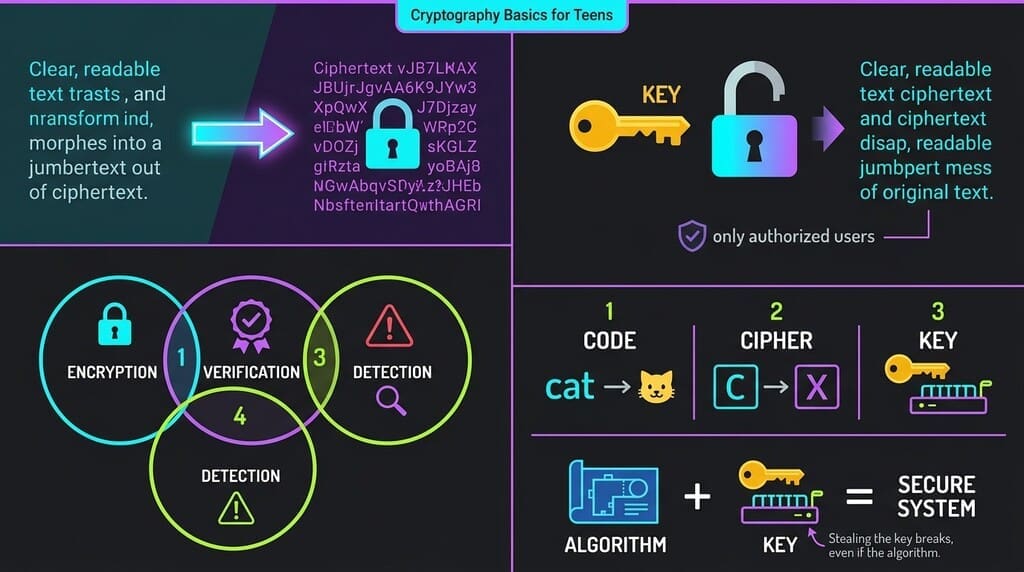
People sometimes confuse codes, ciphers, and keys. A code replaces words or ideas with other symbols. A cipher transforms information using a defined method. Modern systems usually rely on ciphers and keys. The algorithm describes the method—the key controls how the method is applied. Good encryption should not depend on hiding its algorithm. Instead, it should remain secure even when attackers know its design. Public review helps experts test algorithms and identify weaknesses. This principle makes key protection especially important. If an attacker steals a key, strong encryption may not help. Weak software can also expose information despite a strong algorithm. Cryptography forms only one part of a wider security plan. Beginners should first understand each tool’s purpose. That foundation makes later technical details easier to learn.
Confidentiality, Integrity, Authentication, and Non-Repudiation
Security teams often describe cryptography through four goals. Confidentiality means only approved parties can read information. Encryption commonly supports this goal. Integrity means systems can detect unauthorized changes. Hashes and message authentication codes can help. Authentication means checking an identity or source. Passwords, certificates, and cryptographic proofs can support it. Non-repudiation means creating evidence that may link an action to its signer. Digital signatures can support that goal. However, a signature alone cannot prove who controlled a device. Systems also need identity checks, secure devices, and reliable records. Different applications need different combinations of these goals. A public notice may need integrity, but not secrecy. A medical record may need confidentiality, integrity, and access controls. These goals create a useful security framework for learners.
Consider sending a private file to a colleague. Encryption can hide its contents during transfer. A hash can help detect a changed file. A digital signature can help verify its source. Authentication can check the colleague’s account. These protections do not automatically provide one another. Encryption does not prove who sent a file. A hash does not hide its contents. A password does not stop every account attack. Good design matches each control to a specific risk. The National Institute of Standards and Technology explains key-management concerns in its SP 800-57 guidance. That guidance matters because security involves more than selecting an algorithm. Teams must create, store, rotate, and retire keys safely. Beginners should keep this full system view in mind.
Keys, Algorithms, and Simple Examples
A cryptographic key is data that controls a cryptographic operation. It may help encrypt, decrypt, sign, or verify information. Some systems use one shared key. Other systems use a related pair of keys. An algorithm is the set of steps used. Imagine a locked box with a secure lock. The algorithm resembles the lock design. The key resembles the physical key that opens it. This comparison has limits, but it helps explain each role. In computers, keys are strings of bits. Their length and how they’re generated affect security. A key should come from a reliable random source. People should not invent one by guessing a phrase. Weak keys make strong algorithms easier to attack. These principles make key management central to cryptography.

People sometimes confuse passwords with cryptographic keys. A password is a human-chosen secret used to prove access. A system may transform it before use. A cryptographic key is usually generated for a specific operation. Passwords often contain less randomness than machine-generated keys. Therefore, systems should not treat them as equal. Password managers can help people create long, unique passwords. Multi-factor authentication can add another account check. Password storage systems should use password-hashing methods. They should not store passwords in readable form or use simple hashes. Later sections explain this distinction. For now, remember that secrets need careful handling. A key leak can expose protected data. A password leak can expose an account. Each problem needs appropriate safeguards.
Why Cryptography Matters in Cybersecurity
Everyday Security and Data Protection
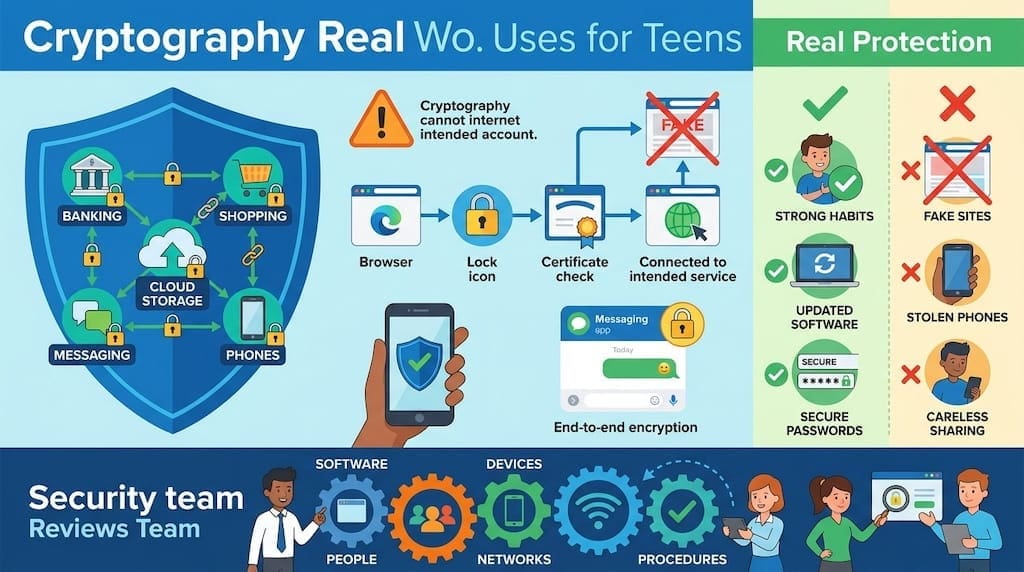
Cryptography protects much more than classified documents. It helps secure banking, shopping, cloud storage, and work accounts. When a browser connects to a protected website, encryption helps protect data in transit. The browser also checks certificate information. That process helps users confirm they reached an intended service. Phones use cryptography to protect stored information. Messaging apps may use end-to-end encryption to limit who reads chats. Software updates can use digital signatures to check their source. These safeguards reduce some risks, but they don’t eliminate all risks. A fake website can still fool a user. A stolen phone can expose an unlocked account. A careless employee can share sensitive data. Cryptography works best when paired with strong security habits.
Organizations use cryptography to protect personal and business information. A clinic may protect medical records. A company may protect customer details and internal files. A public service may protect online forms. Encryption can reduce exposure when someone intercepts data. It can also limit harm after a device goes missing. Still, protection depends on implementation. An outdated application may use unsafe settings. A leaked key can weaken otherwise strong protection. Weak account controls can enable unauthorized access. Security teams therefore assess the whole system. They review software, people, devices, networks, and procedures. Cryptography supports these controls, but does not replace them. This practical distinction prevents unrealistic promises. Entech Online readers can explore cybersecurity learning options. Choose courses that cover tools and safe practice.
Symmetric and Asymmetric Encryption
Symmetric encryption uses the same secret key to encrypt and decrypt information. It works well for protecting large amounts of data. AES is a widely used example when configured properly. The sender and receiver must both access the shared key. This creates a key-distribution problem. How can two people share a secret safely? Asymmetric cryptography helps address this challenge. It uses a public key and a private key. People can share the public key. They must protect the private key. Some systems use public-key methods to establish a shared session key. Symmetric encryption then protects the main conversation. This combination is called hybrid encryption. It balances practical speed with easier key establishment.
Asymmetric methods include public-key encryption and digital signatures. These functions are related but distinct. A public key may support encryption in some systems. A private key may support decryption. In signature systems, the private key creates a signature. A matching public key checks that signature. Modern protocols define how these operations work together. Elliptic-curve cryptography describes a family of public-key methods. It can provide useful security with comparatively compact keys. However, implementations still need careful selection and configuration. Standards can change as research advances. NIST publishes guidance about algorithms and key management. Its cryptographic standards material offers a starting point. Check current standards and software documentation. The right choice depends on context.
Hashing and Password Storage
A cryptographic hash function maps data to a fixed-length output. The same input normally produces the same output. A small input change should produce a very different result. A secure hash makes certain attacks difficult. Hashing is not encryption. It does not use a decryption key to restore the original data. Hashes can help check data integrity. A system can hash a file before and after transfer. If the values differ, the file may have changed. Hashes also support digital signatures and other tools. SHA-256 is a widely used hash function. Older choices, such as MD5, are unsuitable for many security uses. See NIST’s Secure Hash Standard. A hash is a fingerprint, not a hidden copy.
Password storage needs special care. Websites should not store plain-text passwords. They should not rely on one quick hash either. Attackers can test likely passwords against stolen hashes. Password-hashing functions slow guesses and use unique salts. A salt is random data stored beside each password hash. It stops identical passwords from producing identical stored values. Common password-hashing approaches include Argon2id, scrypt, and bcrypt. The best choice depends on current guidance and platform support. Systems should also set suitable work factors. Weak settings may allow fast guessing. Excessive settings may harm service availability. Password hashing differs from general-purpose file hashing. This distinction matters for account security. Beginners should use vetted libraries and current documentation.
Core Cryptographic Methods and Secure Communication
Digital Signatures and Public Key Infrastructure
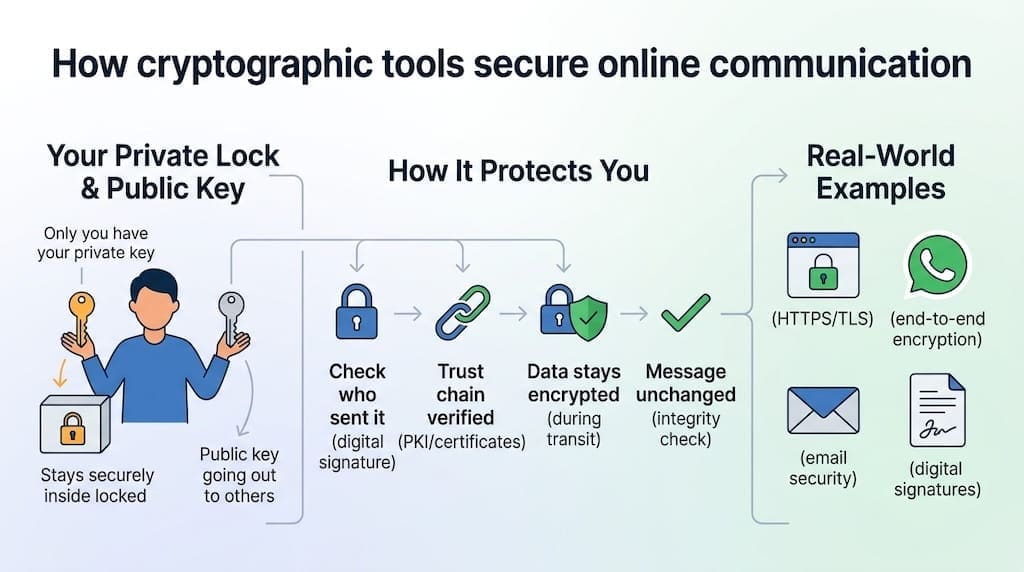
A digital signature helps a verifier confirm a message or file’s origin and integrity. The signer uses a private key to create it. A verifier uses the matching public key to check it. A valid signature can support integrity and source authentication. It does not hide the signed information. Anyone with access may still read it. Signatures depend on trustworthy key ownership. Public key infrastructure, or PKI, links public keys to identities. Certificate authorities issue digital certificates under defined rules. Browsers use certificates to help check website identities. Organizations must protect private signing keys. They also need processes for expired or untrusted certificates. The International Telecommunication Union’s X.509 standard describes certificate frameworks. Key custody and identity checks remain essential.
PKI helps systems decide whether a public key belongs to a claimed identity. A certificate links a key with information about its owner. A trusted authority signs that certificate. Software can check the authority’s chain and certificate status. This does not make every website safe. A valid certificate supports specific identity and connection checks. It does not certify a site’s honesty or quality. Certificate systems also face risks. Authorities can make mistakes. Private keys can be stolen. Users may ignore warnings. Organizations need renewal and revocation procedures. These tasks form part of certificate management. Beginners can learn the trust chain first. Later, networking courses can explain certificate formats and trust stores.
Secure Communication Protocols
Cryptographic protocols define how systems use algorithms and keys together. HTTPS protects web traffic through TLS. The protocol helps systems agree on security settings and establish session keys. It also supports server authentication through certificates. TLS has evolved as experts found weaknesses and improved the design. Newer versions remove several outdated options. Developers should use current, supported library defaults. They should not copy old settings without review. The IETF publishes open protocol standards, including RFC 8446 for TLS 1.3. Messaging systems may use end-to-end encryption. In that model, service providers should not hold message-reading keys. Designs differ between applications. Secure messaging still cannot prevent screenshots or compromised devices. Protocols protect communication paths, not every endpoint.
Email security uses several methods. Transport encryption protects connections between mail systems. It may not protect a message after delivery. End-to-end email encryption can protect message contents between intended users. However, users must manage keys and verify recipients. Secure file transfer also depends on the chosen protocol and configuration. Signal Protocol is used in some messaging applications. PGP tools can support email and file encryption. Each method has different usability and trust assumptions. Users should learn what a service actually protects. Marketing labels alone do not explain its security model. Protocol standards and independent reviews offer better evidence. Open specifications also help researchers identify weaknesses. The key lesson is simple: the protocol matters. Strong algorithms cannot rescue badly designed communication.
How Cryptographic Tools Work Together
A secure connection usually combines several methods. First, the client checks the server’s identity. Next, both sides agree on cryptographic settings. They establish session keys through an approved process. Then symmetric encryption protects the main data exchange. Integrity checks help detect unauthorized changes. These steps happen quickly, so users rarely see them. The browser displays a lock icon or security indicator. That symbol does not mean the website is honest. It mainly reflects connection and certificate checks. Security depends on the protocol, configuration, software, and keys. A system designer must understand how each part fits. Beginners should learn the purpose of each stage. This prevents confusion between encryption, authentication, and trust.
Different applications need different designs. A backup service may encrypt stored files. A website may encrypt data in transit. A messaging app may protect messages end to end. A software update process may verify digital signatures. Each design needs clear decisions about keys and identities. Developers should avoid creating their own protocols. They should rely on reviewed standards and maintained libraries. Teams also need plans for key rotation and recovery. If a key disappears, encrypted data may become inaccessible. If attackers steal a key, they may expose data. These trade-offs belong in a system’s threat model. A threat model identifies likely attackers and valuable data. It guides practical choices better than unthinkingly copying settings.
Cryptography for Beginners: Risks, Practice, and Teaching
Common Cryptographic Attacks and Limits
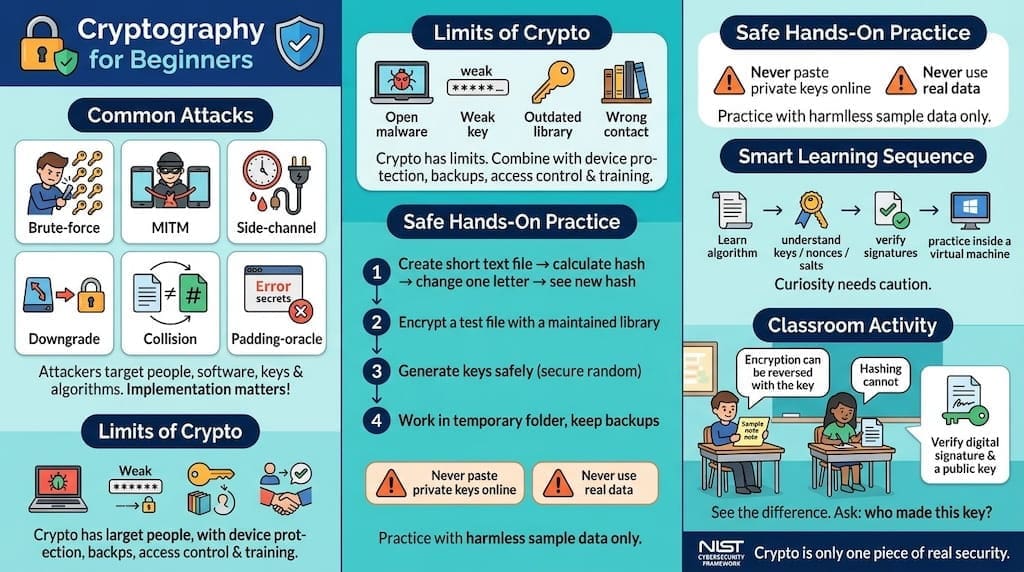
Attackers target people, software, keys, and algorithms. A brute-force attack tries many possible keys or passwords. Strong keys make exhaustive guessing much harder. A man-in-the-middle attack intercepts or changes communication. Authentication checks can reduce this risk. Side-channel attacks use clues such as timing or power use. These clues can reveal information without breaking the underlying math. Downgrade attacks push systems toward weaker options. Collision attacks seek two inputs with the same hash. Padding-oracle attacks exploit certain errors in poorly designed systems. These examples show why implementation matters. Cryptanalysis studies ways to defeat cryptographic protections. Researchers test assumptions and publish findings. Teams should follow updates and security advisories. Threat models guide choices.
Cryptography also has limits. Encryption cannot protect data after an authorized user opens it. Malware can capture information before encryption or after decryption. Weak passwords can allow account takeover. A lost private key may make data unrecoverable. A stolen key may expose protected material. Outdated libraries or unsafe settings can weaken systems. People can send information to the wrong recipient. Social engineering can bypass technical controls. Good security combines cryptography with device protection, backups, access management, and training. The NIST Cybersecurity Framework offers a broader approach to managing risk. It is not a cryptography manual. Instead, it places technical safeguards within wider security work. This is a realistic security mindset for learners.
Hands-On Cryptography for Beginners
Beginners should practice with harmless sample data. Start by creating a short text file. Calculate its hash using a trusted tool. Change one character, then calculate the hash again. Observe how the output changes. Next, use a maintained library to encrypt a test file. Follow its current documentation. Generate keys using secure random functions. Never paste private keys into public websites. Never upload confidential work to online demo tools. If you use a command-line tool, check each command first. Work inside a temporary folder. Keep backups of sample files. These habits prevent accidental data loss. They also teach safe experimentation. Toy examples can teach concepts, but should not protect real information.
A safe learning sequence keeps each task small. First, learn what an algorithm does. Then study keys, nonces, salts, and initialization values. These terms describe different parts of cryptographic systems. A nonce is a value intended for limited use. Reusing certain nonces can expose protected information. Next, practice verifying software signatures or checksums. Use instructions from the software provider. Try demonstrations inside a virtual machine. Keep that machine separate from sensitive accounts. Record what each command does and why. If an error appears, stop and review documentation. Do not turn off security warnings to force a demo. A good exercise builds understanding without risking real data. Curiosity needs caution. The goal is to learn reliable habits.
Classroom Observation: Making Abstract Ideas Clear
I cannot claim personal classroom experience. For an honest teaching example, consider a common beginner activity. Students encrypt a sample note, then decrypt it with the correct key. They also hash a second file and change one character. This contrast clarifies an important point. Encryption can be reversed with the correct key. Hashing does not work that way. Teachers can adapt this activity with non-sensitive text. Ask learners to predict results before running tools. Then compare their predictions with the outputs. This approach makes abstract ideas visible. It encourages careful reasoning rather than memorizing terms. A short reflection can ask which security goal each operation supports. Learners should also explain what the activity does not protect.
A stronger lesson can add a signature exercise. Learners verify a sample file using a supplied public key. Explain that successful verification supports integrity and key association. It does not prove that the file is harmless. Students should ask who created the key and how they received it. This question introduces trust and PKI. Instructors can also discuss why private keys must stay private. Keep exercises inside approved teaching environments. Do not ask learners to test real websites or accounts without permission. A clear classroom policy prevents accidental misuse. It also models professional practice. Afterward, learners can write a plain-language summary. The summary should separate confidentiality, integrity, and authentication. Such active learning supports understanding without claiming one exercise teaches everything.
Learning Paths, Careers, and Further Resources
A Practical Learning Roadmap
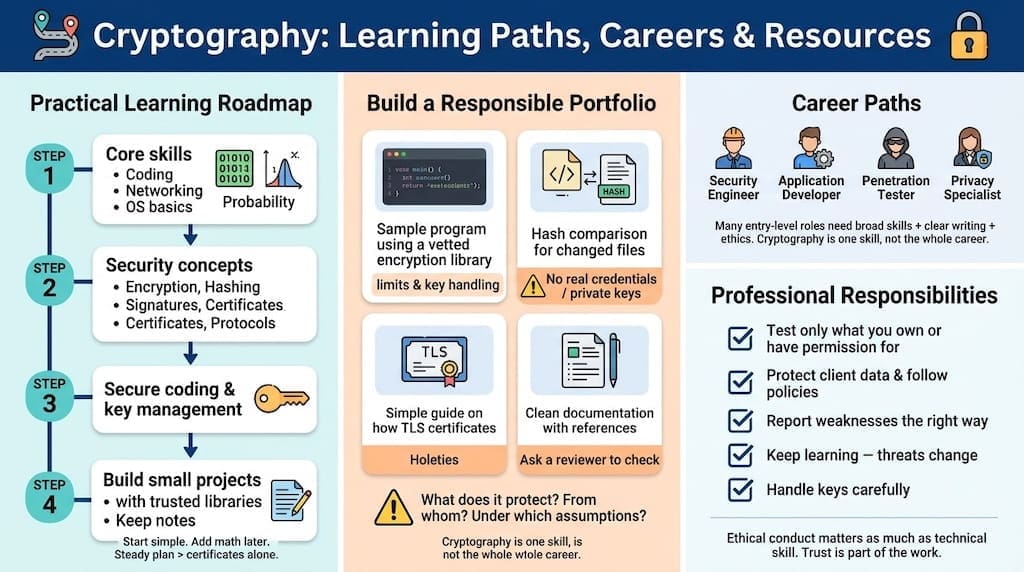
People entering cryptography benefit from core computing skills. Start with basic programming, networking, and operating-system concepts. Learn how data moves between devices: study binary numbers and simple probability. You do not need advanced mathematics immediately. However, algebra and discrete mathematics become useful later. Beginners can start with security concepts. Learn encryption, hashing, signatures, certificates, and protocols. Then study secure coding and key management. Use reputable textbooks, standards, university courses, and open research papers. Build small projects using trusted libraries. Keep notes on each project’s assumptions. Avoid presenting toy work as production-ready security. A steady learning plan beats collecting certificates alone. Add mathematics as your interests grow.
A portfolio can show how you apply ideas responsibly. Document a sample program using a vetted encryption library. Explain its limits and key-handling choices. Create a comparison of hash outputs for changed files. Write a guide explaining how TLS certificates work. Include references to standards and tool documentation. Remove real credentials, personal data, and private keys. Ask a knowledgeable reviewer to check your work. Clear explanations demonstrate security thinking. They also show that you understand risks beyond code. Each project should answer three questions. What does it protect? From whom? Under which assumptions? These questions support responsible design. They also help hiring teams assess your reasoning. Good documentation matters in security work.
Career Paths and Professional Responsibilities
Cryptography knowledge can support many cybersecurity roles. Security engineers configure encryption and identity systems. Application developers protect sensitive information with secure libraries. Cloud engineers manage encryption settings and key services. Penetration testers assess implementations within approved scopes. Security researchers study weaknesses and propose improvements. Privacy specialists review how organizations collect and protect information. Some roles focus on mathematical cryptography research. These positions often require deeper mathematical knowledge and advanced study. Many entry-level jobs instead require broad technical foundations. Employers also value clear writing, careful testing, and ethical judgment. The U.S. Bureau of Labor Statistics tracks employment for information security analysts. Its Occupational Outlook Handbook offers career information. Cryptography is one skill, not an entire career plan.
Professional security work carries clear responsibilities. Test only systems you own or have permission to assess. Protect client information and follow workplace policies. Report weaknesses through approved channels. Do not publish private data or harmful exploit details carelessly. Keep learning because standards and threats change. Read vendor advisories and trusted security resources. If you work with keys, follow documented access rules. Use multi-person approval for sensitive operations when required. Maintain audit records without exposing secrets. These habits help build trust with colleagues and users. Ethical conduct matters as much as technical skill. Beginners can practice that standard from the start. A secure professional protects both systems and people. Trust is part of the work.
How This Guide Was Compiled
This guide combines introductory cryptography concepts with public standards and research links. I organized its explanations from basic goals to algorithms, protocols, risks, practice, and careers. The supplied DOI and publication URLs served as research leads. I also linked selected NIST guidance and an open TLS standard. No experimental findings or career statistics appear without a source. Publication details can change or need full-text review. Confirm each article’s authors, title, issue, and date before republishing. That step prevents inaccurate citations. The classroom activity is labeled as an example. It is not presented as personal teaching experience. Editors with direct experience can add a verified observation. This source-checking process supports accuracy and reader trust.
The article does not provide legal, compliance, or incident-response advice. Cryptographic choices depend on systems, threat models, and current standards. Before deployment, teams should consult current vendor documentation. Qualified security professionals can review high-risk designs. The research links below lead to publication pages or records. Some supplied URLs may require checking for full-text access. A DOI identifies a publication record, but does not guarantee free full text. I have not invented missing article titles or authors. Where the supplied URL lacks complete citation details, the reference identifies its record. Editors should import full metadata from each publisher before publication. This conservative approach avoids fabricated bibliographic details. Always check current standards before implementing cryptography.
Frequently Asked Questions
No. Encryption is one part of cryptography. Cryptography also includes hashing, digital signatures, authentication, and key management. Encryption protects confidentiality by making data unreadable without an appropriate key. Hashing supports integrity checks, but does not restore original data. Digital signatures can help verify integrity and key association. Authentication checks whether a user, device, or service is genuine. These functions solve different problems. A secure system may combine several methods. For example, a website connection can use certificates, key establishment, and symmetric encryption. Cryptography is the larger field. Learning this distinction helps beginners use accurate terms. It also prevents misleading claims, such as “hashing encrypts passwords.”
You can create a toy cipher for learning, but not real protection. New designs may contain weaknesses that experts can miss. Established algorithms receive public review and testing. Even proven algorithms can fail through poor code or unsafe settings. Developers should use trusted libraries and current documentation. They should understand how libraries handle keys, nonces, and errors. Never protect important files with a homemade cipher. If you want to study cipher design, use harmless sample data. Compare your idea with published methods. Ask a qualified instructor or reviewer to assess it. Use reviewed tools for real data. This protects users and supports responsible engineering.
Encryption can be reversed with the correct key. Hashing creates a fixed-length output that isn’t designed to be reversed. Encryption commonly supports confidentiality. Hashes commonly support integrity checks, password storage workflows, and other functions. A hash alone doesn’t prove who created a file—a digital signature can link a message to a private key. Password systems need specialized password-hashing methods. They also need salts and suitable work settings. General-purpose hashes are not automatically suitable for password storage. The right method depends on the task. Choose by purpose, not by name. This habit helps learners avoid using familiar tools incorrectly.
No. Beginners can start by learning the purpose of keys, hashes, encryption, and signatures. Simple diagrams and safe demonstrations can explain many ideas. Basic programming helps learners test concepts. Networking knowledge helps explain secure communication. Later study may use algebra, number theory, probability, and discrete mathematics. Research roles usually need more mathematical depth than many applied security roles. You can build foundations gradually. Try a beginner course, read standards summaries, and practice with sample data. Write down what each tool protects and cannot protect. Start with clear concepts. Add mathematics as your goals require it.
No messaging system can promise complete privacy in every situation. End-to-end encryption can protect message content during normal operation. Yet a compromised phone may expose messages. A recipient can copy or photograph a screen. Backups may use different protection settings. Account recovery can introduce additional risks. Users should review the app’s security model and backup options. They should also keep devices updated and use strong authentication. Encryption reduces certain risks, but cannot prevent every form of surveillance or disclosure. Check the whole system, not just the app label. This also applies to email and cloud storage.
Verified Resources
These links point to government resources or peer-reviewed publication pages. Check each page for available full-text access and complete citation details.
- NIST Special Publication 800-57, Part 1, Revision 5: Key Management
- NIST Secure Hash Standard, FIPS 180-4
- NIST Cryptographic Standards and Guidelines
- U.S. Bureau of Labor Statistics: Information Security Analysts
- Cryptography, volume 10, issue 1, article 12
- Artificial Intelligence Review article record
- Journal of Safety Science and Resilience article record
- Cryptography, volume 7, issue 3, article 40
- IEEE Xplore article record, document 8967098
- ACM Digital Library article record
- IEEE Xplore article record, document 9328432
- Technologies, volume 12, issue 12, article 241
References
The supplied links did not provide complete citation metadata in the prompt. To avoid inventing authors or titles, these entries identify the available publication records. Editors should import complete APA metadata from publisher pages before publication.
- Article record: Cryptography, volume 10, issue 1, article 12. (n.d.). MDPI. https://doi.org/10.3390/cryptography10010012
- Article record. (n.d.). Springer Nature. https://doi.org/10.1007/s10462-025-11466-6
- Article record. (2023). Journal of Safety Science and Resilience. https://www.oaepublish.com/articles/jsss.2023.30
- Cryptography journal. (n.d.). MDPI. https://www.mdpi.com/journal/cryptography
- Article record: Cryptography, volume 7, issue 3, article 40. (2023). MDPI. https://www.mdpi.com/2410-387X/7/3/40
- IEEE Xplore document 8967098. (n.d.). IEEE. https://ieeexplore.ieee.org/document/8967098
- ACM Digital Library article record. (n.d.). Association for Computing Machinery. https://doi.org/10.1145/3292548
- IEEE Xplore document 9328432. (n.d.). IEEE. https://ieeexplore.ieee.org/document/9328432
- Article record: Technologies, volume 12, issue 12, article 241. (2024). MDPI. https://www.mdpi.com/2227-7080/12/12/241
- National Institute of Standards and Technology. (2020). Recommendation for key management: Part 1—General (NIST Special Publication 800-57, Part 1, Revision 5). https://csrc.nist.gov/pubs/sp/800/57/pt1/r5/final
- National Institute of Standards and Technology. (2015). Secure Hash Standard (FIPS PUB 180-4). https://csrc.nist.gov/pubs/fips/180-4/upd1/final
- Rescorla, E. (2018). The Transport Layer Security (TLS) Protocol Version 1.3 (RFC 8446). Internet Engineering Task Force. https://www.rfc-editor.org/rfc/rfc8446
